Call us on 07869 736 071

Free Wi-Fi Upgrade for The Exchange, Maida Vale

Author Bart Jansari | Date 20 November 2025 | See ALL Posts
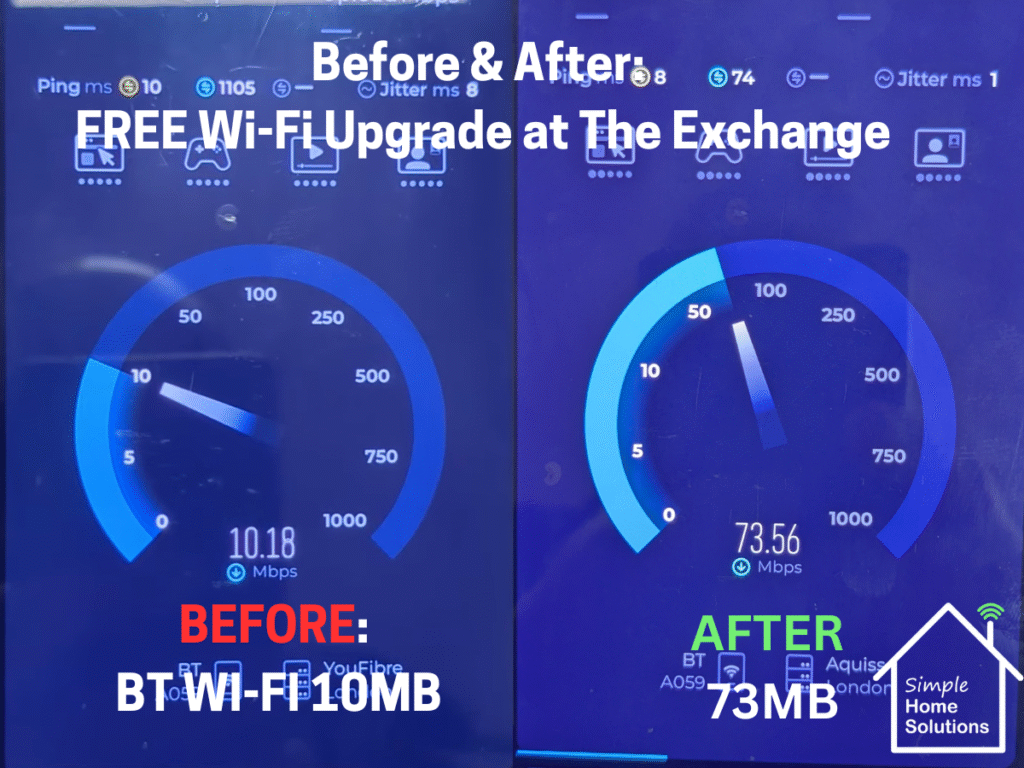
Speed test BEFORE/AFTER graphic: “Before and after Wi-Fi speed tests showing the improved connection at The Exchange, Maida Vale after the UniFi access points were reset and configured.”

The Exchange in Maida Vale is a brilliant community hub — kids activities, neighbours to get together café, workspace, events, support, all under one roof. I visited recently as my brother volunteers here and noticed straight away that something wasn’t right with their Wi-Fi. The access points weren’t working properly, devices weren’t staying connected.

So I volunteered my time to help get everything running the way it should be. A community space relies on stable internet — both for staff and for the local residents who use the space every day — so this was a great opportunity to give something back.

The Problem — Unstable Wi-Fi Across the Building

When I first checked their network, a few issues stood out:

  • They had UniFi APs but none of them were working even though they looked "on"
  • They were relying on BT Discs to spread the coverage even though they had Access Points cabled in
  • On further investigation the APs were actually connected into a Hikvision POE switch that is for cameras and therefore the APs were not actually getting internet connectivity just power

This meant the network was technically “on”, but it wasn’t truly working for the people who depended on it.

What I Did — Full Reset & Rebuild of the UniFi System

To fix the problem properly, I carried out a clean rebuild of the network:

1. Bought, Installed and configured a UniFi controller

So the team can manage the network and see every device connected. And more so the APs will actually communicate properly.

2. Reset and re-adopted all UniFi access points

This ensured everything was properly linked to the controller and working as a single unified system.

3. Set up the Wi-Fi networks correctly

One for staff operations, one for guests — both stable and secure.

4. Tested speeds before and after

This showed an immediate improvement, especially in the café area where the connection had been weakest.

The Results — Faster, More Reliable Wi-Fi for Everyone

The difference after the reset was instant.

  • Faster speeds throughout the building
  • Guest devices now able to connect reliably
  • A fully functioning UniFi controller for easy management
  • Stable coverage in areas that previously struggled
  • No dropouts or timeout issues

Here’s the before/after comparison:

Speed test BEFORE/AFTER graphic:
“Before and after Wi-Fi speed tests showing the improved connection at The Exchange, Maida Vale after the UniFi access points were reset and configured.”

Community spaces rely heavily on technology, and it’s amazing how much smoother everything runs when the Wi-Fi is sorted.

Giving Back to the Community

This job wasn’t charged — it was simply a way to support a local hub that does fantastic work for families, members, freelancers and the wider community.

If any other community centre, library or local organisation needs help with Wi-Fi or tech support, I’m always happy to take a look.


Need Help With Your Own Wi-Fi Setup?

Whether it’s a community building, a busy home, or a business that needs reliable coverage, I’d be happy to help.

👉 Get My Wi-Fi Assessment → simplehs.co.uk/contact

Mission Statement

At Simple Home Solutions, we aim to provide cost-effective, straightforward technology solutions for homes and small businesses. We specialize in resolving WiFi issues, computer support, home entertainment, and home security, ensuring our clients receive reliable, easy-to-understand solutions without unnecessary complexity. We aim to make technology work for you—seamlessly, affordably, and with complete peace of mind.
linkedin facebook pinterest youtube rss twitter instagram facebook-blank rss-blank linkedin-blank pinterest youtube twitter instagram