
Call us on 07869 736 071
Email: info@simplehs.co.uk
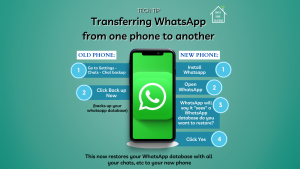
How to transfer Whatsapp to a new phone
More and more of us rely heavily on Whatsapp for daily communication and when you change your phone its important you don’t lose all the chats,pictures, videos etc that you have gathered with your contacts. All of this information is stored in your personal Whatsapp database.
This guide is How to easily Transfer Whatsapp to a new phone.
OLD PHONE
Steps:
Open Whatsapp
Go to Settings - Chats - Chat Back Up
Click Back Up Now
Your Whatsapp database is now backed up (this will usually be to a cloud service like Google Drive or iCloud
NEW PHONE:
Steps:
Install Whatsapp
Ensure you are logged into the same cloud service your Whatsapp database is backed up to in Step 4 above
Open Whatsapp
Whatsapp will now say it “sees” a Whatsapp database and do you want to restore it?
Click Yes
Whatsapp now restores your database with all your chats, pictures, videos etc that you backed up in Step 4 above.
𝑺𝑨𝑽𝑬 𝑻𝑯𝑰𝑺 𝑷𝑶𝑺𝑻 𝒊𝒇 𝒚𝒐𝒖 𝒇𝒊𝒏𝒅 𝒕𝒉𝒊𝒔 𝒉𝒆𝒍𝒑𝒇𝒖𝒍!
