
Call us on 07869 736 071
Email: info@simplehs.co.uk
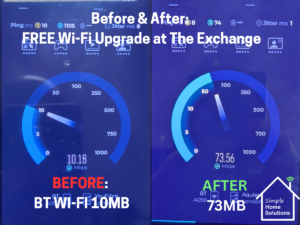
As a Wi-Fi Specialist in Maida Vale, I’ve seen that community organisations often struggle with technology that should work but doesn’t. Usually, the issue isn't that the equipment is wrong, but that it was never set up properly or explained to the people using it. At Simple Home Solutions, we believe tech should be straightforward, which is why we stepped in to help The Exchange get their connection back on track
That was exactly the situation when I visited The Exchange, a community hub in Maida Vale that supports local residents, charities, and organisations.
What started as an informal visit to have a look quickly highlighted why their Wi-Fi had been such a frustration.
The Exchange already had UniFi wireless access points installed in the building. However, it became clear very quickly that the system had never really been set up or handed over properly.
Staff were aware that the access points were “there,” but:
As a result, the UniFi equipment wasn’t actually being used in any meaningful way.
Instead, day-to-day Wi-Fi access relied on BT Wi-Fi discs, which were proving unreliable and problematic for both staff and visitors.
The issue wasn’t the internet connection, and it wasn’t a lack of hardware — it was simply that the UniFi access points had never been properly adopted, configured, or managed.
Given the Exchange’s role in the local community, I offered to help free of charge and get their existing setup working the way it should have done from the start.
The work included:
A simple controller was added and the system configured properly, which is how it should have been to start with.
Once the UniFi system was configured correctly, the difference was immediate.
The Exchange now benefits from:
Most importantly, Wi-Fi is no longer something staff have to think about — it just works in the background.
This situation is far more common than most people realise, particularly in charities and community hubs:
In many cases, Wi-Fi problems aren’t solved by buying more kit — they’re solved by setting up what’s already there properly.
Helping The Exchange was about more than fixing Wi-Fi.
It was about:
Providing practical, hands-on help like this is something we’re always happy to do where we can.
If your organisation already has Wi-Fi equipment but it isn’t performing as expected, the issue may not be the hardware at all.
Whether it’s a home, business, or community space:
No guesswork.
No unnecessary upgrades.
Just technology that works the way it should.
